What Are Browser Games? How They Work, Run, and Compare to Downloaded Games

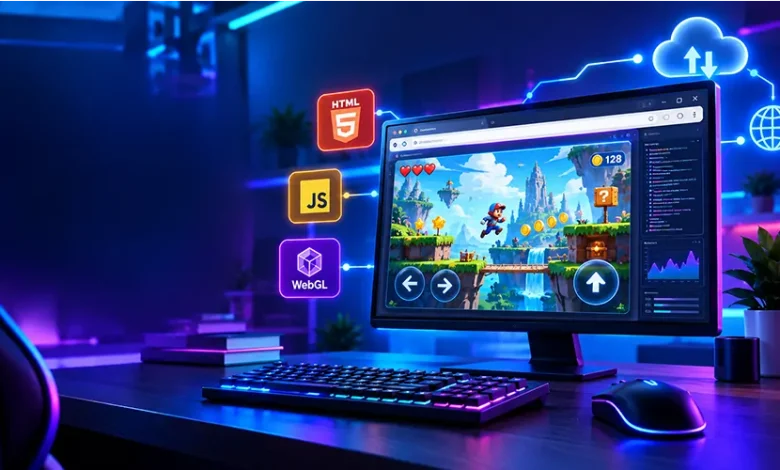
If you can open a game by visiting a website and start playing without installing a traditional game client, you are probably using a browser game. But what are browser games exactly, and what happens behind the scenes when a game runs inside Chrome, Firefox, Edge, Safari, or another modern web browser?
Browser games are games delivered through web technology rather than requiring a conventional desktop or console installation. Depending on the game, they can range from simple puzzle and arcade experiences to surprisingly sophisticated multiplayer, strategy, simulation, and action games.
This guide explains how browser games work, what technologies make them possible, what you need to play them, where they differ from installed games, and what to consider when choosing one.
The Basic Idea Behind a Browser Game
A browser game is software that uses a web browser as its playing environment. Instead of downloading a complete executable application and installing it on your computer, you normally visit a webpage where the game loads the resources it needs.
The browser acts as an intermediary between the game’s code and your device. It can process game logic, display graphics, play audio, detect keyboard or mouse input, and communicate with online servers.
The experience can therefore be as simple as clicking a tile in a puzzle game or as complex as controlling a multiplayer strategy game while information is continuously exchanged with a server.
Browser Games Are More Than Simple Web Pages
A common misconception is that browser games are simply webpages with a few interactive buttons. Modern web browsers can support considerably more advanced functionality. Technologies such as HTML5, JavaScript, WebGL, WebAssembly, and browser audio capabilities allow developers to create games with animation, real-time interaction, physics, sound, and substantial amounts of game logic.
The exact capabilities depend on the game and the device, but the underlying principle remains the same: the browser provides the environment in which the game’s web-based code runs.
What Happens When You Start a Browser Game?
Starting a browser game may look almost instantaneous, but several processes can take place between opening a webpage and seeing the first playable screen.
- The browser requests the webpage. Your browser contacts the website’s server and retrieves the files required by the page.
- Game resources begin loading. These can include JavaScript files, graphics, fonts, audio, level data, and other assets.
- The browser processes the game code. JavaScript, WebAssembly, or other web technologies can handle the game’s logic.
- The graphics are rendered. The browser displays the game’s visual elements using technologies appropriate to the experience.
- Your input is detected. Keyboard, mouse, touchscreen, or controller input can be interpreted by the game.
- Online communication may begin. Multiplayer games and games that save progress online can exchange information with a remote server.
Not every browser game uses all of these steps in the same way. An offline-capable puzzle game, for example, can have very different technical requirements from a real-time multiplayer game.
The Technologies That Power Browser Games
The term “browser game” describes how a game is delivered, not a single programming technology. Different games can use different combinations of web standards and development tools.
HTML
HTML provides the basic structure of a webpage. In a game, it can be used alongside other technologies to organize elements of the gaming interface and provide the foundation on which interactive content is presented.
JavaScript
JavaScript is widely used for interactive web experiences. In games, it can control rules, menus, input handling, animations, game states, and communication with web services.
WebGL
WebGL allows browsers to display hardware-accelerated 2D and 3D graphics. It is particularly useful for games that require more sophisticated visual rendering than a basic webpage.
WebAssembly
WebAssembly, often abbreviated as Wasm, provides a way to run compiled code in web environments. Developers can use it for performance-sensitive tasks and for bringing certain types of existing game technology into browsers.
Web Audio
Browser audio capabilities allow games to produce music, sound effects, environmental audio, and other interactive sounds. A game can adjust audio based on events happening during play.
These technologies can work together, meaning a single browser game may rely on several layers of web technology rather than one specific system.
Browser Games vs. Downloaded Games
The biggest difference is how the game reaches your device. A browser game is generally accessed through a web browser, while a traditional PC game is normally installed as an application on the operating system.
| Feature | Browser Game | Downloaded Game |
|---|---|---|
| Access | Usually through a web browser | Usually through an installed application |
| Installation | Often little or no traditional installation | Normally requires installation |
| Updates | Often handled by the website or web application | Usually handled by the game client or platform |
| Storage requirements | Can be relatively small on the local device, depending on the game | Can require substantial local storage |
| Device compatibility | Depends heavily on browser and web support | Depends on operating system and hardware requirements |
| Internet dependence | Many require an internet connection, although some can support offline use | Varies by game |
Neither category describes every possible gaming experience. Some browser games are lightweight and simple, while others can demand significant processing power. Likewise, downloaded games range from tiny casual titles to large productions requiring substantial storage and powerful hardware.
Why Do People Choose Browser Games?
Browser gaming has a practical advantage: the browser is already a familiar environment for many people. When a compatible game is available online, there may be fewer barriers between discovering the game and trying it.
Browser games can also be useful when someone wants a short gaming session rather than a large installation. A puzzle game, arcade challenge, or quick strategy session can fit naturally into a few spare minutes.
Another useful feature is platform flexibility. A web-based game may work across different operating systems when the browser and required web technologies are supported. However, compatibility should never be assumed; developers can target specific browsers, screen sizes, input methods, or hardware capabilities.
What Types of Games Work Well in a Browser?
Browser games cover a broad range of genres. The best fit depends on how much processing, graphics performance, storage, and online connectivity the particular game requires.
- Puzzle games: Match-three games, logic challenges, word games, and other puzzles can work especially well in short sessions.
- Arcade games: Fast controls and straightforward objectives make many arcade concepts suitable for web play.
- Strategy games: Turn-based and browser-based strategy experiences can use web interfaces effectively for maps, resources, and decision-making.
- Action games: Modern browsers can support responsive action gameplay, although performance depends on the game and device.
- Simulation games: Management and building games can use persistent online systems to maintain player progress.
- Multiplayer games: Web technologies can connect players to shared servers for competitive or cooperative experiences.
The genre itself is not a technical guarantee. A complex multiplayer game can have substantially different requirements from a small single-player puzzle, even though both are browser games.
How Multiplayer Browser Games Communicate
Multiplayer browser games need a way to exchange information between players and the game’s server. When you move a character, submit an action, or interact with another player, relevant information may be transmitted over the internet.
The server can then process game events and send updated information back to connected players. The exact architecture varies considerably between games.
This is one reason internet quality matters more for some browser games than others. A single-player puzzle may continue smoothly without continuous communication, while a real-time competitive game can be much more sensitive to latency and connection interruptions.
Latency Is Not the Same as Internet Speed
Internet speed describes how quickly data can generally be transferred, while latency concerns the delay involved in communication. A connection can have high download speeds while still experiencing noticeable delay in a game if its latency or connection stability is poor.
For real-time games, connection stability can therefore be just as important as raw bandwidth.
What Do You Need to Play Browser Games?
The requirements vary from one game to another, but the basic setup is usually straightforward.
- A modern web browser that supports the technologies used by the game.
- A compatible computer, tablet, or mobile device.
- A stable internet connection for games that rely on online services.
- A keyboard and mouse for games designed around traditional desktop controls.
- Touch controls or a compatible controller when the game supports alternative input methods.
For more demanding browser games, device performance can become important. Limited memory, an older processor, weak graphics capabilities, or a large number of simultaneously running browser tabs can affect responsiveness.
Why a Browser Game Might Run Slowly
A game that feels slow or stutters is not necessarily suffering from one specific problem. Browser performance depends on the game itself, the device, the browser, the network, and other software running at the same time.
If a browser game performs poorly, try closing unnecessary tabs and applications first. Keeping the browser and operating system updated can also help maintain compatibility with current web technologies.
For graphics-heavy games, reducing available visual effects or selecting a lower quality setting, when the game provides one, may improve performance.
If the problem affects only online multiplayer play, check whether the issue is related to the connection rather than graphics performance. A game can render smoothly while still feeling delayed when communication with the server is unstable.
Browser Gaming and Security: What Should You Check?
Playing a game in a browser does not automatically make a website trustworthy. The same basic caution used for other websites should apply to gaming pages.
Before entering an account password, downloading an optional file, or installing an unfamiliar browser extension, consider whether the action is actually necessary for the game. Avoid entering sensitive information into pages that you do not recognize or trust.
It is also useful to pay attention to the website address and browser security warnings. If a page unexpectedly asks you to install software or disable security features just to play a simple game, treat that request cautiously.
Legitimate browser gaming does not require users to ignore normal security practices.
Choosing the Right Browser Game for Your Device
The easiest way to find a suitable game is to match the game’s requirements with the type of experience you want.
| If You Want | Look For |
|---|---|
| A quick session | Simple controls, short rounds, and fast loading |
| A relaxing experience | Puzzle, simulation, or casual gameplay with adjustable pace |
| Competitive play | Responsive controls and reliable multiplayer connectivity |
| More demanding graphics | WebGL or other modern browser-based rendering support |
| Mobile play | Responsive layouts and controls designed for touchscreens |
| Long-term progression | Reliable save systems and clear account or cloud-save functionality |
Reading the game’s requirements before starting can prevent an otherwise enjoyable experience from becoming frustrating. A game designed around a mouse and keyboard may not be comfortable on a phone, while a touch-focused game may feel awkward on a desktop.
Common Misunderstandings About Browser Games
“All Browser Games Are Simple”
Web games can range from extremely lightweight experiences to technically demanding applications. The delivery method does not determine the game’s complexity by itself.
“Browser Games Never Need Internet Access”
Some web games can support offline functionality, but many rely on servers for loading content, saving progress, advertisements, authentication, or multiplayer features.
“Browser Games Cannot Use 3D Graphics”
Modern browser graphics technologies can support 3D rendering. The resulting performance depends on the game’s implementation, browser support, hardware, and other factors.
“You Never Need to Download Anything”
A browser game may not require a traditional installation, but your browser still downloads the files needed to run the experience. Some games can also cache resources locally for faster subsequent loading.
A Simple Way to Understand the Difference
Think of a browser game as a game delivered through the web rather than as a conventional installed application. The website provides the game resources, your browser interprets the supported code and displays the experience, and online servers can provide additional services when needed.
This model explains why browser games can be quick to access while still supporting features such as persistent progress, multiplayer interaction, animated graphics, sound, and complex game systems.
Frequently Asked Questions
What are browser games?
Browser games are games designed to run through a web browser. They use web technologies to handle graphics, controls, game logic, audio, and, when necessary, communication with online servers.
Do browser games require downloads?
Many browser games do not require a traditional game installation. However, the browser still downloads the files and resources needed to run the game.
Can browser games work on phones?
Yes, some browser games are designed for smartphones and tablets. Their suitability for mobile play depends on responsive design, touch controls, browser compatibility, and device performance.
Can browser games be multiplayer?
Yes. Browser games can use online servers and web communication technologies to support multiplayer experiences, including competitive and cooperative gameplay.
Are browser games free?
Some browser games are free to play, while others may use optional purchases, subscriptions, advertisements, or other business models. The specific model depends on the game and its publisher.
Why does one browser game run better than another?
Performance depends on factors such as game complexity, graphics technology, browser support, device hardware, available memory, and network conditions. Two games running in the same browser can therefore have very different performance.
Final Thoughts
Understanding what are browser games becomes much easier when you think of them as games delivered through web technology. The browser provides the environment for running game code, rendering visuals, processing input, playing audio, and communicating with online services.
For players, the practical benefit is flexibility: depending on the title, a browser can provide access to puzzle, arcade, strategy, action, simulation, and multiplayer experiences without the traditional installation process. The right choice ultimately depends on the type of gameplay you want, your device, and the technical requirements of the individual game.