How to Play Online Games Safely and Responsibly | Safe Online Gaming Guide

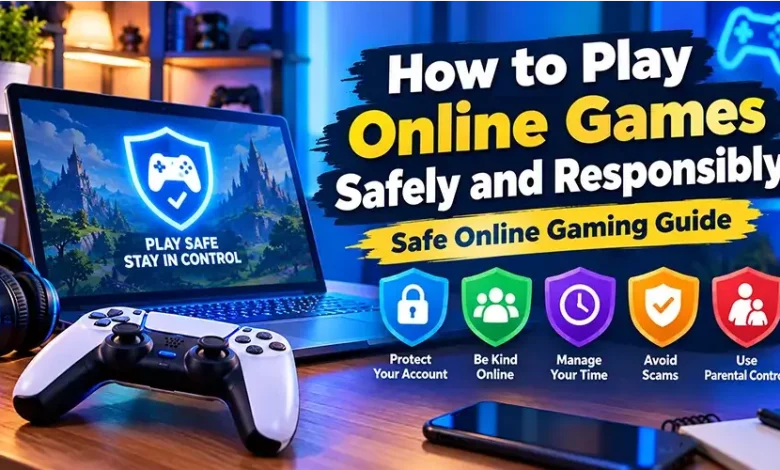
Playing an online game should not require you to trade away your privacy, security, or control over your time. A few simple habits can make a major difference, especially when a game involves online accounts, chat, multiplayer features, downloads, purchases, or links to external websites.
Safe online gaming is less about avoiding every risk and more about recognizing common problems before they become serious. This guide explains how to protect your account, identify suspicious behavior, control spending, manage personal information, and keep gaming enjoyable without letting it interfere with everyday responsibilities.
Start With the Game and Website You Trust
Before playing, pay attention to where the game comes from. A familiar game title does not automatically make every website offering it trustworthy. Look at the address carefully and be cautious when a page suddenly asks for account credentials, payment details, or an unexpected download.
For browser games, the safest approach is to use a legitimate game website or a recognized platform rather than searching for unofficial copies, modified versions, or suspicious download packages.
Be particularly careful with pages that use excessive pop-ups, misleading buttons, fake system warnings, or claims that you must install unknown software to continue. If the page feels unusual, leaving it is usually simpler than trying to determine whether every element is legitimate.
Protect Your Gaming Accounts
Your gaming account can contain more than your game progress. Depending on the service, it may be connected to an email address, purchases, saved payment information, friends, achievements, or other personal details.
Use a strong, unique password for important gaming accounts. Reusing the same password across several services creates a larger problem if one of those services experiences a security breach.
When a game or platform supports two-factor authentication or another additional sign-in protection, consider enabling it. This creates another barrier between your account and someone who obtains your password.
- Use a different password for important gaming accounts.
- Keep the email account associated with your gaming profile secure.
- Enable available additional sign-in protection.
- Never share passwords or verification codes with another player.
- Review account recovery information periodically.
- Sign out of shared or public computers after playing.
A friend asking for your password is still asking for sensitive account information. Legitimate support staff should not need your password or a one-time verification code to prove that they are helping you.
Think Before Sharing Personal Information
Online games make conversation easy, but other players do not need to know everything about you. A username can be enough for ordinary multiplayer interaction without revealing your full name, home address, phone number, school, workplace, or other identifying information.
A useful rule is to share only what is necessary for the game. Even apparently harmless details can become more revealing when combined with information from other websites or social networks.
Be especially cautious when someone you met through a game quickly asks to move the conversation to another platform, requests private photographs, wants to know where you live, or asks questions that have nothing to do with the game.
If information would be uncomfortable to share with a stranger you just met in person, there is usually little reason to share it with a stranger online.
Recognize Common Gaming Scams
Scams often work because they offer something players genuinely want: free items, rare cosmetics, account upgrades, game currency, exclusive access, or an opportunity to make money. The message may appear to come from another player, a moderator, or a service that looks familiar.
Do not assume an offer is legitimate simply because it contains the game’s logo or uses professional-looking language. Verify important claims through the game’s official channels rather than following a link supplied in an unexpected message.
Warning signs worth taking seriously
- A message asks for your password or verification code.
- Someone promises valuable items in exchange for account access.
- A link uses a suspicious or unfamiliar web address.
- You are pressured to act immediately.
- A stranger asks you to install an unknown program.
- A supposed giveaway requires unusual personal or payment information.
- Someone claims to be staff but contacts you through an unexpected channel.
Pressure is an important warning sign. A genuine opportunity does not normally become invalid because you take a few minutes to verify it.
Keep Your Device Secure While Gaming
Security is not only an account issue. Your computer, phone, or tablet also needs protection. Keep the operating system, browser, and security software reasonably up to date, particularly when an update fixes known security problems.
Be selective about downloads. A game-related file should come from a source you trust, and you should understand what you are installing before opening it. Avoid programs advertised as cheats, unauthorized game modifiers, account boosters, or special tools when their origin cannot be verified.
Browser games require less installation than downloadable games, but that does not mean every website is safe. A browser can still display deceptive advertisements, suspicious redirects, or requests for unnecessary permissions.
Before downloading anything, ask yourself
- Do I recognize the source?
- Do I actually need this file or program?
- Is the download being offered through a legitimate channel?
- Does the file match what I expected to receive?
- Is the request for additional permissions reasonable?
Manage In-Game Purchases Before They Become a Problem
Some online games include optional purchases such as cosmetic items, expansions, subscriptions, virtual currency, or other digital content. The important point is to understand what you are buying and how much it costs before confirming a transaction.
Small purchases can be easy to overlook when they are made repeatedly. If a game uses virtual currency, check the real-world price rather than judging a purchase only by the amount of in-game currency displayed on the screen.
| Situation | Safer approach |
|---|---|
| You want an optional item | Wait and decide whether you still want it before purchasing. |
| You are unsure about the price | Check the actual currency cost and purchase terms first. |
| You share a device | Protect purchasing access and avoid leaving payment details exposed. |
| A purchase feels urgent | Pause instead of buying because of pressure or limited-time messaging. |
| You do not recognize a charge | Check your transaction history and contact the relevant service or payment provider. |
Responsible gaming also means being comfortable with not buying something. A digital item can improve a game experience for some players, but it should not become a reason to spend money that you need for other priorities.
Set Boundaries Around Gaming Time
Online games are designed to keep you engaged, and multiplayer matches can make it tempting to continue after you originally planned to stop. A simple way to stay in control is to decide how much time you have available before starting rather than waiting until you are already tired or late.
Use natural stopping points whenever possible. Finishing a match or completing a short activity can make it easier to stop than repeatedly telling yourself that you will quit after just a few more minutes.
- Decide when you need to stop before starting a long session.
- Take breaks during extended play.
- Avoid sacrificing sleep to continue playing.
- Keep important work, study, meals, and other responsibilities separate from gaming time.
- Pay attention if gaming repeatedly interferes with your normal routine.
The goal is not to impose one universal number of gaming hours on everyone. Different people have different schedules. The useful measure is whether gaming fits comfortably alongside sleep, responsibilities, physical activity, relationships, and other parts of daily life.
Make Multiplayer Communication More Comfortable
Competitive games can produce strong reactions, particularly when players are frustrated. You do not have to participate in hostile conversations simply because other players are doing so.
Use mute, block, report, or privacy controls when available. These features are practical tools for controlling your experience, not signs that you have to tolerate abusive behavior.
It is also worth remembering that text and voice communication can remove context. A short message may be interpreted differently from how it was intended, while a heated argument can escalate quickly when neither player is willing to disengage.
When a multiplayer interaction becomes uncomfortable
- Stop responding to provocative messages.
- Mute or block the account when appropriate.
- Use the game’s reporting system for rule violations.
- Save relevant evidence if the service requires information for a report.
- Leave the match or conversation if continuing is no longer worthwhile.
Be Careful With Links Shared by Other Players
Links can appear in game chat, community discussions, private messages, comments, or social groups. A link may lead to a legitimate resource, but it can also redirect you somewhere unexpected.
Before opening an unfamiliar link, consider whether you know who provided it and why you need it. If the destination asks you to sign in, verify the address independently instead of entering credentials immediately.
This is especially important when someone sends a link claiming that you have won a prize, received a rare item, been reported, or need to confirm your account immediately.
A Simple Safe Online Gaming Checklist
You do not need a complicated security routine every time you launch a game. A short checklist can cover the most important habits.
- Use a legitimate game or platform.
- Keep your account password private and unique where practical.
- Enable additional account protection when available.
- Do not share verification codes.
- Limit personal information in public profiles and chats.
- Be skeptical of unexpected prizes, trades, and account offers.
- Avoid unknown downloads and suspicious links.
- Check the real cost before making purchases.
- Use mute, block, and report tools when necessary.
- Take breaks and keep gaming compatible with your responsibilities.
These habits cover most of the everyday decisions that can make online gaming safer without turning a casual gaming session into a complicated security exercise.
What to Do If Something Goes Wrong
Even careful players can encounter a suspicious message, accidental purchase, compromised account, or unsafe interaction. The important thing is to respond quickly rather than continuing to interact with the problem.
If you believe your account has been compromised, use the platform’s official account recovery or security process. Change the affected password and review recent account activity. If the same password was used elsewhere, update those accounts as well.
If you encounter a suspicious player, block or report them through the available platform tools. For unauthorized payments, check the transaction details and contact the relevant game platform or payment provider using its official support channel.
Do not attempt to retaliate against someone who has targeted you. Trying to break into another person’s account or using questionable software can create additional security and legal problems.
Frequently Asked Questions
What does safe online gaming mean?
Safe online gaming means taking reasonable steps to protect your accounts, personal information, devices, money, and time while using online games. It also includes handling multiplayer communication responsibly and knowing how to respond to suspicious activity.
Should I use my real name in an online game?
Usually, there is no need to publicly share your full real name unless a particular legitimate service specifically requires it. A gaming username can provide enough identity for ordinary multiplayer interaction while limiting the personal information visible to strangers.
How can I tell if a gaming link is suspicious?
Look at who sent it, why you received it, and where it leads. Be cautious with unfamiliar domains, unexpected login requests, urgent messages, prize claims, and offers that require you to provide passwords or verification codes.
Are browser games safe?
Browser games can be safe when accessed through reputable websites, but the browser itself does not guarantee that every page is trustworthy. Use legitimate sources, keep your browser updated, avoid suspicious downloads, and be careful with unexpected permissions or redirects.
How can I avoid spending too much on games?
Understand the real-world price of each purchase, decide on a spending limit that fits your circumstances, and avoid buying something simply because a game creates pressure to act immediately. Review transaction history if you regularly make small purchases.
What should I do if another player harasses me?
Stop engaging with the person and use the available mute, block, and reporting features. If the behavior involves a serious threat or another matter requiring outside assistance, preserve relevant information and consider contacting the appropriate service or authority.
Final Thoughts
Good gaming habits are mostly about maintaining control: control over your account, your personal information, your spending, your interactions, and your time. You can enjoy competitive, casual, browser, puzzle, arcade, action, and strategy games without making unnecessary security or privacy compromises.
The most useful approach is simple: use trusted sources, protect your credentials, question unexpected requests, keep purchases intentional, and step away when an online interaction or gaming session stops being healthy or enjoyable.