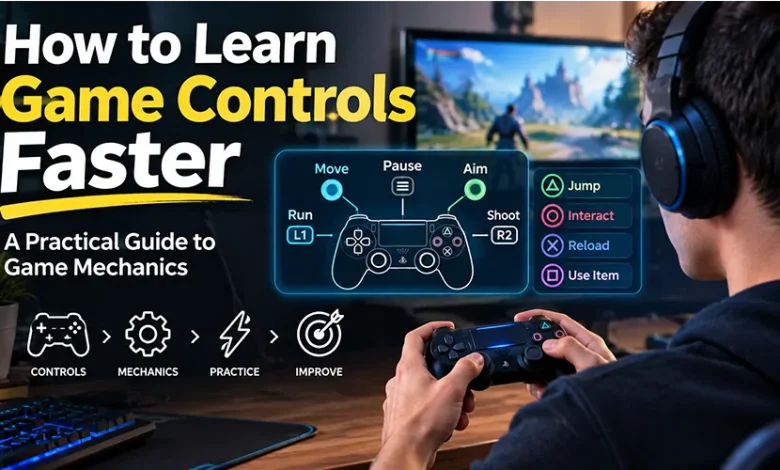
Starting a new game can feel harder than it actually is when you are still thinking about every button press. You may know what you want your character to do, yet hesitate because you are unsure which key, button, or gesture performs the action. The same problem appears when a game introduces unfamiliar movement systems, abilities, inventory menus, aiming methods, or interaction rules.
The fastest way to learn game controls is not to memorize the entire control scheme at once. Instead, identify the small group of actions that matter immediately, practice them in a safe environment, and gradually connect each input to the game’s underlying mechanics. Once those relationships become familiar, you can spend less attention on controls and more on actually playing.
Start With the Actions You Need Most
A common mistake is trying to memorize every control before beginning a game. Modern games can have dozens of commands, but most situations rely on a much smaller set. Movement, camera control, a basic action, interaction, and one defensive or recovery action are often enough to get through the opening section.
Look at the control guide and divide commands into three groups:
- Essential controls: movement, camera, jumping, attacking, interacting, or other actions required to progress.
- Situational controls: blocking, dodging, crouching, changing equipment, special abilities, or contextual actions.
- Rare controls: commands that may only matter in particular missions, advanced strategies, menus, or unusual situations.
Learn the first group before worrying about the third. This reduces mental overload and gives you a usable control foundation within minutes.
Build a Mental Map Instead of Memorizing Buttons
Good players do not necessarily remember controls as isolated pieces of information. They gradually build a mental map connecting an action, an input, and the result on screen.
For example, instead of remembering that a particular key means “dodge,” connect the input with the situation in which you use it: an enemy attacks, you press the dodge input, your character moves away, and the attack misses. That association is easier to retrieve when the same situation happens again.
The same principle applies to controller layouts. If a button is used for jumping, another for attacking, and another for interacting, think about what each action accomplishes rather than concentrating only on the button symbol.
The goal is to make the control-to-action connection automatic, not to memorize a long list of buttons.
A Simple Five-Minute Method for Learning Controls
When opening an unfamiliar game, use the first few minutes as a controlled practice session. You do not need a long training routine. A short sequence can reveal most of the basic control logic.
- Move in every basic direction. Test forward, backward, left, and right movement and notice how quickly the character responds.
- Move the camera independently. Check how sensitive the camera is and whether its movement feels different from character movement.
- Test the primary action. Try attacking, jumping, interacting, shooting, or whatever action the game emphasizes.
- Test one defensive or recovery action. If the game has blocking, dodging, sprinting, healing, or another survival mechanic, practice it early.
- Repeat the actions together. Walk, turn, perform the main action, and recover. Combining inputs helps build muscle memory more effectively than reading them repeatedly.
If the game provides a training area, tutorial room, practice range, or low-pressure opening section, use it for this process. The purpose is to learn how the game responds before difficult situations demand fast reactions.
Understand the Difference Between Controls and Mechanics
Controls and mechanics are related, but they are not the same thing. A control is the input you provide. A mechanic is the rule governing what happens after that input.
| Control | Mechanic | What to Learn |
|---|---|---|
| Pressing a jump button | Character movement and gravity | Jump height, timing, and landing behavior |
| Pressing an attack button | Combat system | Range, timing, recovery, and damage behavior |
| Using a dodge input | Evading attacks | Timing, distance, and possible invulnerability windows |
| Interacting with an object | Contextual interaction | When the action becomes available |
| Changing equipment | Loadout or inventory system | How equipment affects available actions or performance |
Understanding mechanics is what makes controls useful. Knowing which button performs a dodge is only the beginning. You also need to discover when dodging works, how far it moves your character, and what happens immediately afterward.
Learn One Mechanical Relationship at a Time
When a game seems complicated, isolate its systems instead of trying to understand everything simultaneously.
For a combat-focused game, you might first learn movement, then basic attacks, then defense, and finally combinations between them. In a strategy game, you might start with resource collection before learning unit production and map control. In a puzzle game, learn the movement rules before worrying about advanced solutions.
This approach is especially useful because many mechanics depend on earlier ones. Once movement becomes automatic, you can concentrate on positioning. Once positioning is familiar, you can focus on timing. Once timing becomes comfortable, advanced combinations become easier to understand.
Use the Tutorial as a Practice Tool, Not a Checklist
Some players rush through tutorials because they want to reach the main game. That can create a problem later: the instructions were technically seen, but the controls were never practiced enough to become familiar.
Whenever a tutorial introduces an important action, perform it several times if the game allows you to. If it teaches a dodge, do not stop after successfully dodging once. Try moving, turning, dodging at different moments, and immediately returning to an attack.
Pay attention to what the game communicates visually and audibly. Animation changes, sound effects, interface indicators, controller vibration, enemy movements, and on-screen prompts can all help you recognize when a mechanic is available.
What to Do When the Default Controls Feel Awkward
You do not have to force yourself to use a control layout that creates unnecessary difficulty. Many games allow players to remap keyboard keys, controller buttons, sensitivity settings, or other input options.
Before changing everything, identify the specific problem. If your hand repeatedly reaches for the wrong key, move only the problematic command first. If the camera feels too sensitive, adjust camera sensitivity rather than changing unrelated controls.
A useful control layout should make frequently used actions easy to reach without requiring uncomfortable hand movements. The ideal arrangement is also personal: a layout that feels natural to one player may feel awkward to another.
How to Learn Controls When You Keep Forgetting Them
Forgetting a control is normal when the game has many commands. Instead of repeatedly reopening the entire control menu, focus on the inputs you actually forget during play.
- Keep the control guide accessible during your first sessions if the game allows it.
- Practice the forgotten action several times in a low-pressure situation.
- Associate the input with a specific gameplay situation.
- Use consistent controls instead of changing the layout repeatedly.
- Return to the same mechanic later rather than trying to memorize everything in one session.
Repetition matters because controls become easier when they move from conscious recall toward automatic response. You eventually stop thinking, “Which button is dodge?” and start reacting to the situation itself.
Practice With Short, Repeatable Drills
Short drills can be more useful than simply playing through difficult sections and hoping the controls become familiar. A drill isolates one skill so you can repeat it without distractions.
Movement drill
Move around an open area while changing direction, stopping, turning the camera, and interacting with nearby objects. The goal is to understand acceleration, responsiveness, and camera behavior.
Combat drill
Practice the basic attack, defensive action, movement, and recovery sequence. Focus on timing rather than damage output.
Navigation drill
Move through a small area without relying constantly on markers. This helps you understand how the environment communicates objectives and direction.
Menu drill
Open the inventory, equipment, map, settings, or ability screens and learn how to move between them. This is particularly helpful in games where menu actions are part of normal gameplay.
Watch for Game-Specific Input Patterns
Different genres often teach players to think about controls in different ways. Recognizing these patterns can make unfamiliar games easier to understand.
- Action games: timing, positioning, movement, attacks, and defensive responses are often closely connected.
- Arcade games: quick reactions and a small number of highly important inputs may matter more than complicated menus.
- Puzzle games: understanding what each action changes is usually more important than fast button presses.
- Strategy games: selecting units, managing resources, issuing commands, and reading information efficiently can be more important than reaction speed.
- Browser games: controls may be simple, but understanding objectives, interface elements, upgrades, and game-specific rules can take more attention.
The genre does not determine every control scheme, but it can give you a useful starting point for identifying which systems deserve attention first.
Common Mistakes That Slow Down Control Learning
Trying to memorize everything immediately
A long control list is difficult to retain without context. Start with the actions you use constantly and add less frequent commands as they become relevant.
Changing controls too often
Constantly experimenting with different layouts can prevent muscle memory from developing. Change a control when there is a clear reason, then give yourself time to adapt.
Ignoring the camera
In many games, camera control is almost as important as movement. Poor camera awareness can make otherwise simple actions feel difficult.
Learning inputs without learning timing
Knowing which button performs an action does not tell you when to press it. Timing is often part of the mechanic itself.
Practicing only under pressure
Difficult fights or timed challenges are poor environments for learning basic controls. Practice unfamiliar actions where mistakes have limited consequences whenever possible.
How to Move From Basic Controls to Advanced Play
Once the basic controls feel automatic, stop deliberately thinking about every input. Instead, begin practicing combinations that reflect actual gameplay decisions.
For example, an action game player might progress from movement to movement plus attack, then movement plus defense, and finally positioning, defense, and attack in a single sequence. A strategy player might progress from selecting a unit to selecting several units, issuing commands, checking resources, and responding to changes on the map.
The important transition is from remembering controls to using controls to solve problems. Advanced skill develops when your attention moves away from the buttons and toward timing, positioning, planning, and decision-making.
A Quick Checklist for Your First Session
When starting an unfamiliar game, this checklist can help you become comfortable without spending unnecessary time studying the entire manual.
- Find the basic movement controls.
- Learn camera or aiming controls.
- Identify the primary gameplay action.
- Find the main defensive, recovery, or escape action.
- Test interaction controls.
- Check whether controls can be remapped.
- Learn one important game mechanic at a time.
- Practice unfamiliar inputs in a low-pressure area.
- Repeat useful combinations until they feel natural.
- Add advanced commands only when the game requires them.
Frequently Asked Questions
How long does it take to learn game controls?
Basic controls can often become familiar during the first session, especially when a game has a simple control scheme. More complex games may require several sessions because understanding the mechanics also requires learning timing, combinations, menus, and situational actions.
What is the fastest way to learn game controls?
Focus first on the controls you use most frequently, then practice them in actual gameplay or a safe training area. Repeatedly connecting an input with a specific action is generally more useful than trying to memorize the entire control list at once.
Should I change the default controls?
Change them if a specific key or button consistently feels uncomfortable, difficult to reach, or easy to confuse with another input. If the default layout feels natural, keeping it can make tutorials and external guides easier to follow.
Why do I know the controls but still play badly?
Knowing an input and using it effectively are different skills. You may understand which button performs an action but still need to learn its timing, range, positioning requirements, cooldown, or relationship with other mechanics.
Is it better to use a keyboard or controller?
There is no universal choice for every game. Keyboard and mouse controls can offer precise pointing and flexible key access, while controllers can feel natural for movement-focused games. The better option depends on the game’s control design and your own comfort.
Final Thoughts
Learning game controls becomes much easier when you treat the process as skill building rather than memorization. Start with essential actions, connect each input to its result, practice mechanics in manageable pieces, and gradually combine those actions under real gameplay conditions.
If a new game feels confusing at first, slow down long enough to understand its basic control language. Once movement, camera control, and core actions become automatic, you can give your attention to the part that matters more: making better decisions inside the game.