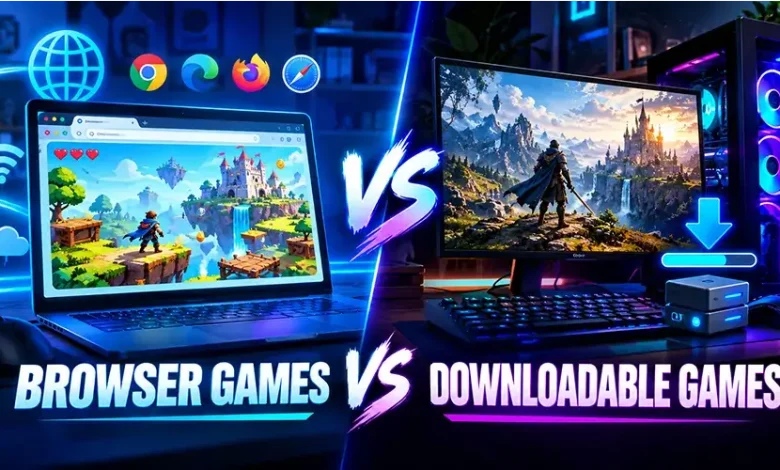
Choosing between a browser game and a downloadable game often comes down to a simple question: do you want to start playing immediately, or are you willing to install software for a more substantial gaming experience? Both formats can deliver enjoyable gameplay, but they handle storage, performance, updates, accessibility, and device compatibility in very different ways.
Understanding the differences between browser games vs downloadable games can help you choose the better option for your situation. A quick puzzle session on a shared computer has different requirements from a large strategy game you plan to play for months. This guide breaks down the practical differences so you can make that choice without relying on assumptions about either format.
The Basic Difference Between Browser and Downloadable Games
A browser game runs through a web browser such as Chrome, Firefox, Edge, or Safari. Instead of installing the complete game as traditional software, you normally open a webpage and load the game through the browser. Many casual, puzzle, arcade, card, strategy, and multiplayer games use this approach.
A downloadable game requires you to obtain and install game files on your computer, phone, tablet, or console. Once installed, some or all of the game’s resources can be stored locally, although modern downloadable games may still require internet access for updates, authentication, multiplayer features, or online services.
The distinction is therefore not simply about whether a game uses the internet. A browser game is defined primarily by where the game runs, while a downloadable game is installed on the device itself.
A Quick Side-by-Side Comparison
| Feature | Browser Games | Downloadable Games |
|---|---|---|
| Installation | Usually no traditional installation | Requires downloading and installing files |
| Storage | Usually requires little local storage | Can require substantial storage space |
| Starting a game | Often quick to access | Requires installation before playing |
| Updates | Often handled through the website or game service | Usually requires downloaded updates |
| Device flexibility | Can work across compatible browsers and devices | Depends on supported operating systems and hardware |
| Performance | Depends heavily on browser, hardware, and connection | Can make greater use of local hardware resources |
| Storage management | Generally simpler | May require managing large game files |
| Offline play | Often limited, depending on the game | More commonly available, depending on the title |
Why Browser Games Are Convenient
The biggest advantage of browser games is accessibility. When a game is designed to run directly in a browser, you can often reach it without going through a lengthy installation process. This makes the format particularly useful when you want a short gaming session rather than a permanent installation.
For example, imagine using a computer at school, a work device where you cannot install software, or a family computer with limited storage. A compatible browser game may be more practical because the game can be accessed without adding a large application to the machine.
Browser games can also make it easier to move between compatible devices. If the game stores progress through an online account or service, you may be able to continue from another device without transferring a complete installation. The exact experience depends on how the individual game handles saved data.
Good Situations for Browser Games
- You want to start playing quickly.
- You have limited storage space.
- You cannot easily install applications on the device.
- You prefer short gaming sessions.
- You use more than one compatible device.
- You mainly play casual, puzzle, arcade, or lightweight strategy games.
Where Downloadable Games Have an Advantage
Downloadable games can provide developers with more control over local game resources. Instead of loading everything through a webpage, the installed application can store game assets directly on the device. This can be useful for games with detailed graphics, large environments, complex simulations, or extensive audio and video content.
Installation does come with an upfront cost in time and storage. A large game may take considerable disk space, and future patches can require additional downloads. However, once the required files are installed, the game may not need to repeatedly load the same resources from a website.
Downloadable games can also be better suited to players who want deeper settings and longer-term installations. Depending on the platform and game, users may have more options for graphics configuration, controllers, local saves, accessibility settings, and other features.
Performance: Which Format Runs Better?
There is no universal performance winner. The result depends on the game, device hardware, browser, operating system, network conditions, and how efficiently the game has been developed.
A lightweight browser game can run extremely well on an ordinary computer, while a demanding downloadable title may require dedicated graphics hardware and significant system resources. On the other hand, an advanced downloadable game can take advantage of local hardware in ways that may not be practical for a browser-based experience.
Browser performance can also be affected by other open tabs, extensions, background processes, browser settings, and available memory. If a browser game feels slow, closing unnecessary tabs and applications can sometimes make a noticeable difference.
For graphics-intensive gaming, always check the actual requirements of the specific title rather than assuming that downloadable automatically means better performance.
Internet Connection and Offline Gaming
Internet dependence is another important difference, but it is easy to oversimplify. Browser games commonly require an active connection because the game itself is accessed through a website or relies on online services.
Downloadable games have more potential for offline play because their core files can be stored locally. However, installation does not automatically mean a game works completely offline. Some downloadable titles require online authentication, regular connections, multiplayer servers, cloud synchronization, or online features.
If offline gaming matters to you, check the specific game’s requirements before installing it. The word “downloadable” alone does not guarantee offline functionality.
Updates Are Handled Differently
One of the less obvious differences between the two formats is how updates reach the player.
Browser games can often receive changes on the service side. When you return to the game, the latest version may load automatically through the website without requiring you to manually install a traditional patch.
Downloadable games normally use an update process that modifies files already stored on your device. Large games can therefore require substantial update downloads, especially when developers release major patches or new content.
Neither approach is automatically better. Browser-based updates can reduce maintenance for the player, while downloadable updates can support large and complex applications that rely heavily on locally stored resources.
Storage Space Can Change the Decision
Storage is easy to overlook until your device starts running low on space. Browser games are generally attractive when you want to avoid dedicating large amounts of storage to a game.
Downloadable games can range from relatively small applications to very large installations. Players who regularly install several large games may need to monitor available storage and occasionally remove titles they no longer use.
This matters especially on devices with limited storage. If you mainly want quick access to simple games, using a browser can reduce the need to manage a growing collection of installed files.
Which Option Fits Different Types of Players?
Instead of asking which format is universally better, consider what you expect from the game.
For Quick Casual Sessions
Browser games are often a natural fit when you have ten or twenty minutes available and want to begin playing without a lengthy setup. Puzzle games, simple arcade experiences, card games, and other lightweight titles can work particularly well in this environment.
For Long-Term Gaming
A downloadable game may make more sense when you expect to spend many hours with one title and want features designed around a persistent installation. Large single-player adventures, complex simulations, and technically demanding games often belong in this category.
For Limited Storage
Browser games can be useful when storage space is a concern. You can avoid filling a drive with large game installations while still having access to a broad range of playable experiences.
For Powerful Gaming Hardware
If your computer or console has substantial processing and graphics capability, downloadable games may allow you to take greater advantage of that hardware, particularly with demanding 3D titles.
For Shared or Restricted Devices
Browser games may be more practical when you are using a device where installing new software is restricted. You should still follow the rules of the organization or device owner before accessing games.
Browser Games Are Not Necessarily Simple Games
A common misconception is that anything played in a browser must be basic. Modern web technologies allow browsers to run games with considerably more sophisticated graphics, controls, audio, and multiplayer systems than the simple web games many players remember from the past.
At the same time, technical capability does not mean every browser game will match a large installed game in visual complexity or system requirements. The design goals are often different. Browser games frequently emphasize accessibility and quick entry, while downloadable games may devote more resources to extensive content and advanced systems.
What About Security and Downloads?
The difference between browser and downloadable games also changes how you should approach software sources. With browser games, the main concern is choosing a legitimate website and avoiding suspicious pages, deceptive buttons, or unexpected downloads.
With downloadable games, the safest approach is to obtain software from the game’s official publisher, a recognized platform, or another trusted distribution source. Avoid unofficial installers that claim to provide modified or unauthorized versions of a game.
Regardless of format, keep your operating system, browser, and security software updated. A familiar game title does not make an unfamiliar download source trustworthy.
A Simple Decision Checklist
If you are still unsure which format suits your needs, consider these questions before choosing:
- Do you want to play immediately? A browser game may be more convenient.
- Do you have very limited storage? A browser-based option can reduce installation requirements.
- Do you need offline access? Look specifically for a downloadable game that supports offline play.
- Are you looking for demanding graphics? Check the system requirements of downloadable titles and compare them with your hardware.
- Are you using a restricted computer? A browser game may avoid software installation, where permitted.
- Do you expect a large, long-term game experience? A downloadable title may provide the type of installation and feature set you need.
The key is to judge the individual game rather than the format alone. A well-designed browser game can be a better choice than a poorly suited downloadable game, and the reverse can also be true.
Common Mistakes When Choosing a Game Format
Assuming Downloadable Means Offline
Installation and offline functionality are separate features. Always check whether an internet connection is required after installation.
Assuming Browser Means Low Quality
A browser-based game can be polished and technically impressive. The browser format does not automatically determine the quality of the gameplay.
Ignoring Storage Requirements
A game may initially appear attractive until you discover that its installation and future updates consume more storage than expected. Check the requirements before downloading large titles.
Forgetting About Device Compatibility
A browser game may require a modern browser or specific hardware capabilities, while a downloadable game may support only certain operating systems. Compatibility should be part of the decision from the beginning.
Frequently Asked Questions
Are browser games free?
Many browser games can be played for free, but not every browser game follows the same business model. Some may include optional purchases, memberships, or other forms of monetization. Check the individual game’s terms and features.
Do browser games need to be downloaded?
Traditional browser games are designed to run through a web browser without a conventional game installation. A website may still use cached data or ask for permission for certain browser features, but that is different from installing a complete desktop game.
Can downloadable games work without the internet?
Some can, but it depends on the game. Certain titles support offline play after installation, while others require internet access for authentication, updates, multiplayer, or core functionality.
Are downloadable games always better for graphics?
No. Downloadable games can support highly demanding graphics because they can use local hardware and stored assets, but a game’s visual quality depends on its technology, design, optimization, and hardware requirements rather than its distribution format alone.
Which is better for a low-storage computer?
A browser game can be more convenient when storage is limited because it generally avoids a large traditional installation. However, browser performance still depends on the computer’s available memory and processing resources.
Final Thoughts
Browser games and downloadable games solve different gaming needs. Browser games emphasize accessibility, quick entry, and reduced installation requirements, while downloadable games can offer deeper local installations, extensive content, and greater use of device hardware.
When comparing the two, focus on what you actually need: playing time, storage, internet access, performance, device compatibility, and the type of experience you want. Once those factors are clear, choosing between the two formats becomes much simpler.